Front-end development
Anton
Strandqvist.
Hi, I’m Anton. I’m a front-end developer based in Stockholm. I’m interested in how code can make the web feel more interactive.
Front-end development
Hi, I’m Anton. I’m a front-end developer based in Stockholm. I’m interested in how code can make the web feel more interactive.
Hyper Island / DMC 2016
I studied at Hyper Island too. I graduated from DMC in 2016.
This is my third time teaching this class. I’ve also taught the creative coding courses you’ll take later in the program.
Work
I work at Umain as a Senior Front End Lead.
I also run Poser.Global, where I build interactive installations and create video and lighting for live music.
I’ve done freelance work through my own company, Strandqvist Studio.
What I’ve worked on
What I’ve worked on
What I’ve worked on
What I’ve worked on
What I’ve worked on
What I’ve worked on
In class
We’ll learn by building small things, changing them, and seeing what happens. When something behaves differently than we expected, we’ll look at the code and figure out why.
Course plan / Week 1
Self-study / facilitated by school.
/ Onsite Day 1
Morning · Quick recap of Git and GitHub workflows (branches and PRs), then an introduction to the Hyper Chirp project brief.
Afternoon · Walk through the API documentation for /api/chirps and test endpoints using fetch.
/ Onsite Day 2
Morning · Lecture on asynchronous JavaScript, async/await, error handling, and API states (loading, success, and error).
Afternoon · Workshop on fetching and displaying the live Hyper Chirp feed in custom UI components.
Course plan / Week 2
/ Onsite Day 3
Morning · Lecture and demo on sending data via POST, handling forms, and using AI coding assistants such as Copilot or ChatGPT effectively.
Afternoon · Build forms to post to the feed, including tags and anonymous mode.
/ Onsite Day 4
Full day · Hands-on support and feedback. Focus on implementing likes, tag filtering (?tag=FED28), and search using the API.
Course plan / Week 3
/ Onsite Day 5
Morning · Lecture and demo on adding features such as auto-refresh with polling or displaying AI sentiment analysis on posts.
Afternoon · Team workshop on building advanced features and polishing the user interface.
/ Onsite Day 6
Full day · Feedback and group code reviews focused on clean code structure, accessibility, and critically evaluating AI-generated code.
Course plan / Week 4
/ Onsite Day 7
Morning · Workshop on final bug fixes, UI/UX polish, and code refactoring.
Afternoon · Final mentoring session before project delivery.
/ Onsite Day 8
Morning · Each team presents its custom Hyper Chirp client and posts live to the class feed.
Afternoon · Course wrap-up, feedback, and team retrospective.
Class expectations
I set aside time to be here and teach you. I expect everyone to attend every scheduled class. Your class reps will take attendance each class day.
Attendance is required to receive a grade. If you miss class for a legitimate reason, you’ll get a make-up assignment. You must complete it by the end of that week to receive a grade.
Please focus on completing the assignment and skip Slack messages explaining your absence. You’re welcome to message me if you have questions about the assignment.
Class expectations
Most of our important work will happen in class, when I live code with you and we work through the examples together.
I’ll share all the slides and provide YouTube videos covering each subject so you can revisit it whenever you need a refresher.
Working with APIs
Working with APIs
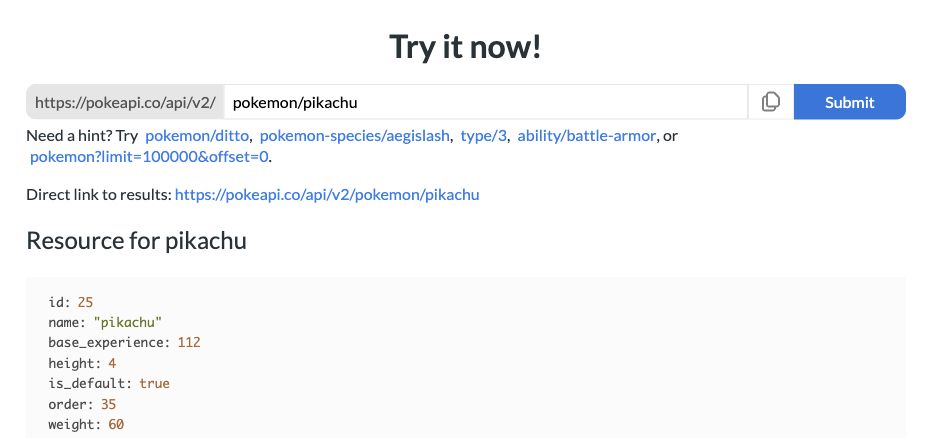
PokéAPI is a free public API for Pokémon data, including types, abilities, and images.
Request a Pokémon by name or ID and get its data back as JSON. You don’t need an API key.
Working with APIs
PokéAPI sends the data back as JSON. Here are four fields from the Pikachu response.
{
  "id": 25,
  "name": "pikachu",
  "height": 4,
  "weight": 60
}Live demo
Class setup
Open your terminal and check that both commands print a version.
node -v
npm -v
We’ll use npm to install the starter’s dependencies and run Vite locally. If you need to install or update Node.js, download an LTS release, then reopen your terminal.
Class setup
I’ll live code from Hyper Vite Starter. Follow along in your own local copy and try the same edits as we go.
Copy the clone URL from GitHub and use it in place of REPO_URL. Then open the local URL Vite prints.
git clone REPO_URL
cd hyper-vite-starter
npm ci
npm run devOpen main.js in your editor and keep the Vite preview open. We’ll make the first edit together.
Project brief
In teams, you’ll build your own front end for a shared class feed. Your app will use the Hyper Chirp API to fetch and display chirps and let people post new ones.
Open the project in your browser. We’ll go through the brief and look at /api/chirps together.
Git recap
We used git clone to get the starter. To practice pushing to GitHub, fork the starter and clone your fork.
Before an edit · Update your local main, then create and switch to a feature branch.
git switch main
git pull
git switch -c feature/page-heading
Git recap
After we edit the page heading in main.js, check what changed. Stage the file and review what you staged.
git status
git diff
git add main.js
git diff --staged
git commit -m "Update the page heading"
git log --oneline -5
A commit saves a snapshot in your local repo. git log shows it in your history.
Git recap
I’ll show how to push a branch to GitHub. If you’re following along from a fork, this pushes to your copy. After the first push, use git push for new commits on that branch.
git push -u origin feature/page-headingI’ll open a pull request into main, review the changes on GitHub, and merge it. If you try it, choose main in your own fork as the base.
Back in your terminal, run git switch main and git pull to get the merged changes.
Fetch API Introduction ↗
Traversy Media shows how to request data and read a JSON response with plain JavaScript.
Git and GitHub for Beginners ↗
Gwen Faraday covers cloning, committing, and pushing. Skip to 32:42 for branches and pull requests.
If you missed class, complete these two tasks by the end of the week.